Multi-Tier Azure VNet Architecture
In the world of cloud computing, it’s easy to get captivated by the latest serverless functions or container orchestration platforms. However, the unsung hero of any robust and secure cloud application is the network architecture it’s built upon. A poorly designed network can expose critical data, hinder scalability, and create operational nightmares. Conversely, a well-architected network provides a fortress of security and a flexible foundation for growth.
This post will dissect a foundational network architecture for a typical multi-tier application hosted in Microsoft Azure. We’ll explore how simple but powerful concepts like virtual networks, subnets, and network security groups come together to solve a critical business problem: how to build an application that is both accessible to the public and internally segmented to protect its most sensitive components, like databases. This design is the essential blueprint for moving beyond a single “all-in-one” virtual machine and embracing a professional, production-ready cloud infrastructure.
Architecture Overview
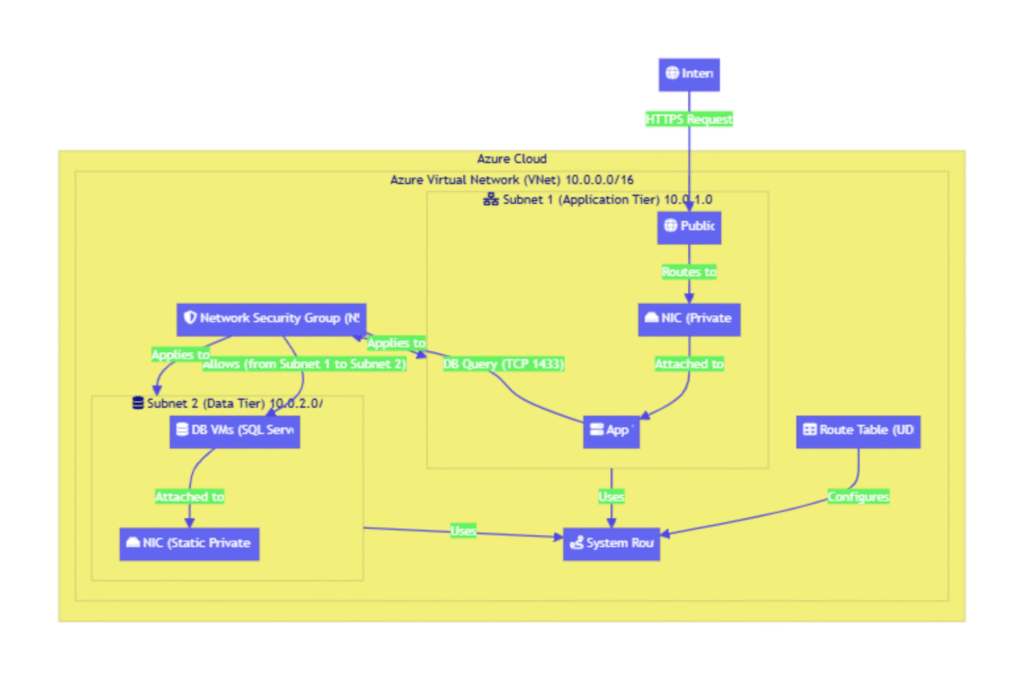
At a high level, this diagram illustrates a classic N-tier application architecture implemented within an Azure Virtual Network (VNet). The core idea is to separate the application’s components into isolated network segments, or subnets, based on their function and security requirements.
The typical data flow for a user request would be:
- A user’s request from the internet targets the application’s public IP address.
- This traffic is routed to the Network Interface Card (NIC) of the “app” Virtual Machine (VM), which resides in a dedicated front-end subnet (labeled
subnet 1). This VM is responsible for handling application logic. - To fulfill the request, the application VM needs to retrieve or store data. It initiates a connection to one of the database (
db) servers. - These database servers are isolated in a separate back-end subnet (
subnet 2). Critically, they do not have public IP addresses and are inaccessible from the internet. - Traffic between
subnet 1andsubnet 2is strictly controlled by a Network Security Group (NSG), which acts as a virtual firewall. The NSG ensures that only the application VM is allowed to communicate with the database servers, and only on the specific ports required for database traffic (e.g., TCP port 1433 for SQL Server).
This segmentation ensures that even if the public-facing application server were compromised, the attacker would face another hardened security boundary before they could access the sensitive data stored in the databases.
Component Breakdown
Let’s dive deeper into the individual components that make up this architecture.
Azure Virtual Network (VNet) and Subnets
The VNet is the fundamental building block. It’s your private, isolated network space within the Azure cloud, defined by a specific IP address range (e.g., 10.0.0.0/16). All resources within the VNet can communicate with each other by default.
To achieve security and organization, the VNet is divided into smaller segments called Subnets. In this architecture, we have two distinct subnets:
subnet 1(The Application Tier): This subnet houses the application logic VM. It is the only subnet that contains resources exposed to the public internet via a Public IP address.subnet 2(The Data Tier): This subnet is reserved for the database servers. It is a completely private network segment with no direct inbound or outbound internet connectivity, maximizing its security posture.
Virtual Machines (VMs) and Network Interfaces (NICs)
The compute resources in this IaaS (Infrastructure-as-a-Service) model are Virtual Machines.
appVM: A VM insubnet 1running the core application code.dbVMs: Multiple VMs insubnet 2hosting the database software.
Each VM connects to the VNet via a Network Interface Card (NIC). The NIC is a critical component that gets assigned a private IP address from its subnet’s IP range. As the diagram notes, this IP configuration can be either dynamic (assigned automatically via DHCP) or static. For critical backend services like databases, a static IP is essential for stable and predictable connectivity from the application tier.
Public IP Address
To make the application accessible from the outside world, a Public IP address resource is created and associated with the NIC of the app VM. This provides a fixed, internet-routable entry point to the application. It’s crucial to note that only the front-end components that need to be directly reached from the internet should have a Public IP.
Network Security Groups (NSGs)
The Network Security Group (NSG) is the primary tool for enforcing traffic rules and is the cornerstone of this architecture’s security. An NSG is a stateful firewall that filters network traffic to and from Azure resources in a VNet. It contains a list of security rules that allow or deny traffic based on a 5-tuple: source IP, source port, destination IP, destination port, and protocol.
Key features highlighted in the diagram include:
- Association: NSGs can be associated with either a NIC or an entire subnet. Applying an NSG to a subnet is a best practice, as it ensures all resources within that subnet inherit the same baseline security policy.
- Inbound/Outbound Rules: Rules can be defined for both incoming (inbound) and outgoing (outbound) traffic.
- Rule Example: The diagram shows a perfect example of a least-privilege rule:
from subnet1, to subnet2, tcp:1433 - allow. This explicitly permits traffic originating from the application subnet to the database subnet, but only on the standard SQL Server port. All other traffic is implicitly denied. - Flexible Source/Destination Definitions: Rules can be defined using IP address ranges, Service Tags (Microsoft-managed labels for Azure services like
Sql.EastUS), or Application Security Groups (ASGs). ASGs are a powerful feature that lets you group VMs with similar functions (e.g., “AppServers”) and use that group name in NSG rules, which greatly simplifies management at scale.
Routing and Route Tables
By default, Azure provides a system router (rtr) that allows traffic to flow automatically between all subnets within a VNet. For most standard N-tier applications, this is sufficient. However, the diagram includes a Route Table, which allows for the creation of User-Defined Routes (UDRs). UDRs override Azure’s default routing behavior. A common use case is to force all outbound traffic from a subnet through a Network Virtual Appliance (NVA), such as a third-party firewall, for advanced inspection and logging before it goes to the internet.
Key Design Decisions
This architecture isn’t just a collection of components; it’s a series of deliberate design choices aimed at achieving specific security and operational goals.
- Why use multiple subnets? The Principle of Least Privilege.
The most important decision here is the network segmentation. By placing the application and database servers in separate subnets, we create a security boundary. This enforces the principle of least privilege at the network layer. A potential compromise of the public-facingappVM does not grant an attacker direct network access to the database servers. They would still need to bypass the NSG firewall, providing a critical layer of defense-in-depth. - Why Network Security Groups over just host-based firewalls?
While host-based firewalls (like Windows Firewall or iptables) are an important part of a defense-in-depth strategy, NSGs provide a centralized, cloud-native layer of control. They are managed independently of the VM’s operating system and can be audited and automated easily through Azure Resource Manager (ARM). Applying an NSG at the subnet level ensures that a baseline security policy is enforced on all resources within that segment, regardless of their individual configuration. - Why use Application Security Groups (ASGs)? For Scalable Policy.
The diagram mentions ASGs as a way to define NSG rules. This is a critical design choice for scalability. Imagine you have 50 application servers insubnet 1. Without ASGs, your NSG rule would need to list all 50 source IP addresses. When you add the 51st server, you must update the rule. With ASGs, you simply place all app servers in an “AppServers” ASG. The NSG rule is then simply:Allow traffic from source ASG-AppServers to destination ASG-DbServers. When new VMs are added to the ASG, the rule applies to them automatically, making the system vastly easier to manage.
Scalability & Security Considerations
A strong architecture must be ableto grow and defend itself.
- Scalability: This design is inherently scalable. The application tier in
subnet 1can be scaled out by adding more VMs and placing them behind an Azure Load Balancer. The database tier insubnet 2can be scaled by adding read replicas or implementing a database clustering solution. The IP address space for each subnet should be planned with future growth in mind to avoid having to re-architect later. The use of ASGs, as mentioned, is crucial for ensuring security rules scale effortlessly with the number of VMs. - Security: Security is woven into the fabric of this design.
- Isolation: The primary security benefit comes from the strict isolation of the database tier in
subnet 2, which has no public internet exposure. - Traffic Filtering: NSGs provide granular, stateful traffic filtering between tiers, ensuring only legitimate and necessary communication is allowed.
- Limited Attack Surface: By exposing only a single application endpoint via a Public IP, the overall attack surface of the system is significantly minimized.
- Defense-in-Depth: This network architecture is the first of many security layers. It should be combined with other best practices like identity and access management (IAM), data encryption at rest and in transit, and regular vulnerability scanning on the VMs themselves.
- Isolation: The primary security benefit comes from the strict isolation of the database tier in
Conclusion
This Azure VNet architecture, while simple, demonstrates the fundamental principles of building a secure and scalable cloud infrastructure. By leveraging network segmentation with subnets and enforcing strict traffic controls with Network Security Groups, it creates a robust foundation that protects sensitive data while enabling application growth. It proves that a well-designed network is not merely a plumbing exercise; it is the essential blueprint for a secure, resilient, and enterprise-ready cloud solution.
As a next step, this foundational design could be enhanced by introducing an Azure Application Gateway or Load Balancer in front of the application tier for traffic management and SSL offloading, and by using Azure Bastion for secure, RDP/SSH-less administrative access to the VMs.